22.10.2026 - Reading time ~15 Minutes
Monitoring the boat network with SignalK
This is a third part of the manual how to use Mikrotik LAMP R16 on the boat.
The second one is about making a dumbest tablet a navigation device.
Let’s be honest: a modern boat without internet is a boat without half of its brains. Weather forecasts and GRIB files, the marina’s WhatsApp, the AIS picture beyond the horizon, chart updates, the bank’s login code, work (yes, some of us work from the boat), and the kids’ cartoons, which are the most mission-critical service on board. When the internet drops, everything is “loading…”, and the whole crew looks at you, because you’re the one who installed “that router”.
And here’s the funny part: the router is the one device on board you can’t just go and look at. LAMP sits on top of the mast or on the pushpit, in its sealed box, with one cable going down. No lights to stare at, no screen, nothing. Is it the signal? Is it the carrier? Is the router alive at all? Did the modem decide to take a nap while still saying it’s connected? It happens, and it’s a true issue: 5G in a busy marina is a lottery, and LTE out at sea is a lottery without tickets.
Disclaimer: there’s no cure for a bad signal. A dashboard won’t give you internet in the middle of the Tyrrhenian Sea. But it will tell you in one glance whether it’s the sea, the carrier or the router, and that’s half of the solution.
So LAMP needs an eye. And the boat most probably already has the right place to put it: Signal K, the open-source boat data server that collects everything from NMEA, sensors and instruments, often running on a Raspberry Pi somewhere under the chart table. If it shows the wind and the depth, it can show the internet too.
What we’re building
LAMP (LTE, GNSS, SMS) ─┐
                       ├──REST, read-only── Signal K plugin ──WebSocket── dashboard on any tablet/phone/laptop
RB751G (Wi-Fi) ────────┘
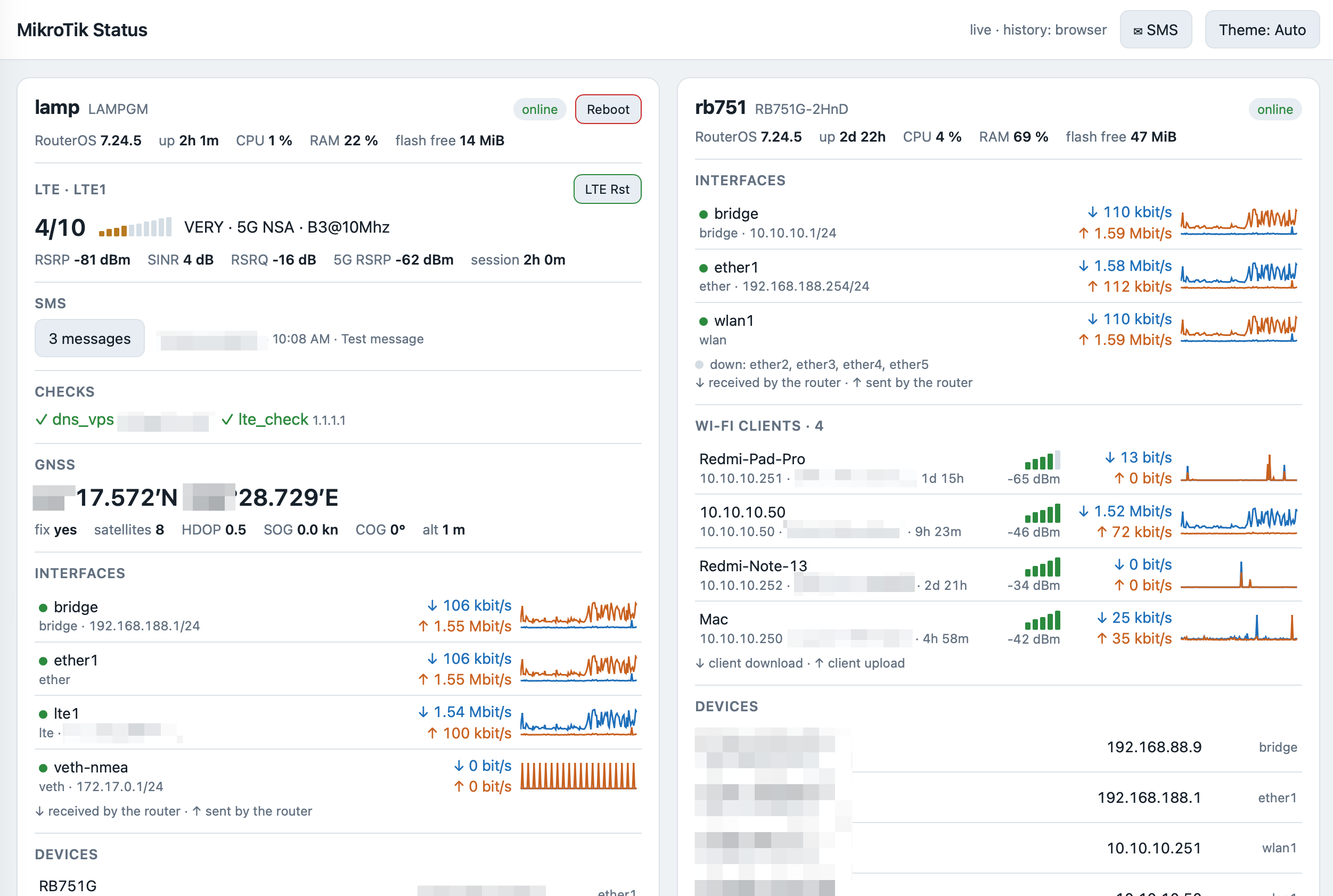
A small Signal K plugin, signalk-mikrotik, reads every MikroTik router on board through the RouterOS REST API and publishes everything under mikrotik.<router>.*. The same plugin serves a dashboard web page, the one in the picture above. One card per router, built from whatever the router has: no LTE, no LTE section; no Wi-Fi, no Wi-Fi section.
What you see on LAMP’s card:
| Section | What it tells you |
|---|---|
| Header | RouterOS version, uptime, CPU, RAM, free flash, online badge. And a red Reboot button. |
| LTE | Signal score 1–10 with bars, 4G or 5G, band, RSRP, SINR, RSRQ, how long the session lives. “Connection issues” in red when the internet is gone, a 5G switch and a green LTE Rst button. |
| SMS | How many messages, the latest one. Tap to read all of them. |
| Checks | The router’s netwatch entries, ✓ or ✗. |
| GNSS | Position, fix, satellites, HDOP, speed, course. |
| Interfaces | Traffic in and out with a 10-minute chart. |
| Devices | Who’s connected where. |
And on the Wi-Fi router’s card: the Wi-Fi clients with their signal and traffic. That’s how you find out that it’s not the internet that is slow, it’s the kid’s tablet downloading a 40 GB game update.
The useful thing is the combination. “Signal 2/10, SINR −3 dB” means move the boat or wait. “Signal 7/10, Connection issues” means the carrier or the modem is stuck, press LTE Rst. “Card is grey, offline since 14:32” means the router itself is gone, go check the cable. No guessing.
Prerequisites
- Signal K server 2.x on Node.js 18 or newer.
- MikroTik routers with RouterOS 7.9 or newer. LAMP from the first part, and any other MikroTik on board.
- The Signal K host can reach the routers on TCP port 80.
- For the recovery buttons: the NMEA container from the second part.
Preparing the routers
On each router, create a user that can read everything and change nothing. Replace SK_PASS with a password of letters and digits:
/user group add name=signalk policy=read,test,api,rest-api
/user add name=signalk group=signalk password=SK_PASS
read is for the settings and tables, test is for the LTE and GPS monitor commands. No write, so the dashboard can’t break anything even if it wanted to.
REST lives on the router’s web service, so make sure it’s on:
/ip service set www disabled=no
/ip service print where name=www
If the address column shows addresses, the Signal K host’s network must be among them. For example, LAMP set up as in the first part allows only its own boat network, and a Signal K box behind a second router comes from that router’s address:
/ip service set www address=192.168.188.0/24,10.10.10.0/24
Keep what was already there, add the new one with a comma.
On LAMP, set the GPS to decimal degrees, it’s the least ambiguous format:
/system gps set coordinate-format=dd
Test it from the Signal K host:
curl -u signalk:SK_PASS http://ROUTER_IP/rest/system/resource
JSON with cpu-load and uptime means it works. 401 means a wrong password. A timeout means www is off or doesn’t allow your address.
Note: REST over plain HTTP sends the password in clear text over the boat network. The user is read-only and the boat network is yours, so I can live with that. If you can’t, RouterOS can do HTTPS, but then you get to deal with certificates on a boat. Your choice.
SMS
If you followed the first part, LAMP already receives SMS and keeps the newest 20. Otherwise:
/tool sms set port=lte1 receive-enabled=yes polling=yes
The signalk user can read the inbox, nothing else to do. Why SMS on a dashboard at all? Because the carrier sends “your data plan is over” and “your top-up was successful” to the SIM that lives on the mast, and you’d better see those without climbing.
Installing the plugin
The plugin is three files: package.json, the plugin itself index.js and the dashboard public/index.html. Download them all at once as signalk-mikrotik.tar.gz to the Signal K host and install:
mkdir -p ~/signalk-plugins && cd ~/signalk-plugins
curl -LO https://y-b.one/signalk-mikrotik/signalk-mikrotik.tar.gz
tar xzf signalk-mikrotik.tar.gz
cd ~/.signalk && npm install ~/signalk-plugins/signalk-mikrotik
sudo systemctl restart signalk
No dependencies, nothing downloaded from npm. The plugin uses only what Node.js has built in, and the dashboard is one HTML file without external fonts or scripts, so it works when the internet doesn’t. Which is, you know, exactly when you need it.
Note: if Signal K runs in Docker,
~/.signalklives in the container’s volume. Copy the folder there and runnpm installinside the container.
Configuring it
In the Signal K admin: Server → Plugin Config → MikroTik RouterOS, tick Enabled and add one entry per router:
| Field | LAMP | Wi-Fi router |
|---|---|---|
| Device ID in paths | lamp |
rb751 |
| Router IP address | 192.168.188.1 |
10.10.10.1 |
| User / Password | signalk / SK_PASS |
signalk / SK_PASS |
| Interfaces to report | ^(?!lo$) |
^(?!lo$) |
| Recovery trigger URL | see below | empty |
Click Submit. The status line says Polling 2 router(s): lamp, rb751, and the dashboard is at:
http://SIGNALK_IP:3000/signalk-mikrotik/
It’s also listed in the Signal K admin under Webapps as MikroTik Status. Put it on the tablet’s home screen and it’s an app.
What it reads and how often:
| Data | Every |
|---|---|
| GNSS | 1 s |
| Interface traffic, Wi-Fi clients, LTE signal | 5 s |
| Devices, system, netwatch, SMS | 30 s |
| Internet check | 60 s |
That’s about one request per second plus a handful every few seconds. Even the old RB751G with its 400 MHz CPU doesn’t notice.
Little things that matter
- Themes: the Theme button cycles Auto → Day → Dark → Night, which is red on black. On a night watch you don’t want a white screen burning your night vision. Each tablet remembers its choice.
- Offline routers don’t disappear: the card goes grey with the last values and
offline since HH:MM. So you know when it died, which is often the best hint why. - SMS: a new message turns the header button into ✉ SMS · 1 new with a pulsing red dot. Tap it, and a side panel shows all messages, newest first. Each tablet tracks what it has already seen.
- History: the charts keep 10 minutes in the browser. If Signal K records history (InfluxDB, for example), the charts load it on open.
- Layout: two cards side by side on a tablet in landscape, one on a phone.
When the internet hangs
Every minute the plugin asks LAMP to ping 1.1.1.1 and 9.9.9.9. One answer from either is enough. Three minutes without any, and Connection issues appears in red next to the LTE heading. It goes away with the first answer.
That’s all it does automatically: it reports. It never restarts anything. I tried the automatic way first, of course, and it was a bad idea. The modem also gives the boat its GPS, and every modem restart costs up to 12 minutes without a position. In a marina that’s annoying. At sea, out of coverage, an automatic watchdog would kill the GPS again and again, every few minutes, exactly when it’s needed for navigation. So the dashboard tells you, and you decide.
To decide something, you need buttons:
- LTE Rst, green, on the LTE heading. Switches the LTE connection off and on. The internet is back in about 20 seconds, the GPS usually keeps its fix. Try this first.
- Reboot, red, in the card header. Reboots the whole router: internet, boat network, DNS and NMEA drop for about 2 minutes.
- 5G, a switch left of LTE Rst, green when on. Switches 5G off and on. Here’s why it exists: with a poor signal, 5G NSA (5G on top of LTE) can keep losing its 5G part, and the session goes dead while the router still says it’s connected. LTE Rst helps for a minute or two, then it dies again. With 5G off, LAMP stays on plain 4G LTE until you switch it back on, even after a reboot. If the hangs stop, you know who’s guilty.
Note: the modem has an AT command to switch 5G off (
AT+QNWPREFCFG="nr5g_disable_mode"), but on MikroTik R16 devices RouterOS quietly reverts it within minutes. The switch changes RouterOS’s ownnetwork-modeinstead, removing or adding5g, and that one stays.
All of them ask for confirmation, and a second press within 3 minutes is refused, so a nervous double tap doesn’t reboot the router twice.
The trigger on LAMP
The plugin’s signalk user is read-only, and I want it to stay that way. So the buttons don’t talk to the router directly. They call a tiny web trigger running in the busybox container from the second part, on a secret address. It knows these actions:
| Address ends with | Action |
|---|---|
?lte |
Restart the LTE connection. |
?5g-off / ?5g-on |
Switch 5G off (LTE only) and back on. |
?reboot |
Reboot the router. |
| nothing | Power-cycle the modem, as if you unplugged it for 5 seconds. For when even LTE Rst doesn’t help. |
After a 5G switch, an LTE restart or a power-cycle, it also watches the router’s GPS reader for a few minutes and restarts it if it got stuck. Yes, that happens too: after a modem power-cycle RouterOS sometimes just stops reading the GPS until you switch it off and on.
Two more files go next to run.sh from the second part. start.sh starts the trigger and then the NMEA server as before. Edit only CYCLETOKEN, the secret part of the address, at least 20 random letters and digits (openssl rand -hex 12 makes one):
#!/bin/sh
# Starts the modem power-cycle web trigger, then the NMEA server (run.sh).
# The router starts it as: start.sh serve <password> <lte-interface>

# ---- Setting ----
CYCLETOKEN="ChangeMeToALongRandomString" # secret part of the trigger URL, letters and digits only
# -----------------

# Remove Windows line endings, then run the cleaned copy. #
mkdir -p /tmp #
[ -z "$START_CLEAN" ] && tr -d '\r' < "$0" > /tmp/start.sh && export START_CLEAN=1 && exec /bin/sh /tmp/start.sh "$@" #

# The trigger reads the router API address from here. /tmp is inside the container only.
printf 'API=%s\n' "http://nmea:$2@172.17.0.1/rest" > /tmp/cycle.env
mkdir -p /tmp/www/cgi-bin
tr -d '\r' < /nmea/cycle.cgi > "/tmp/www/cgi-bin/$CYCLETOKEN"
chmod 755 "/tmp/www/cgi-bin/$CYCLETOKEN"
httpd -p 8080 -h /tmp/www
exec /bin/sh /nmea/run.sh "$@"
cycle.cgi does the actual work through the router’s REST API, no changes needed:
#!/bin/sh
# Recovery trigger, through the router's REST API. One action per 3 minutes.
#   ?lte     restart the LTE connection (interface off and on)
#   ?reboot  reboot the whole router
#   ?5g-off  switch 5G off (LTE only), ?5g-on switch it back on
#   (none)   power-cycle the LTE modem
# After any LTE change or a power-cycle it restarts the router's GPS reader if it got stuck.
LOCK=/tmp/modem-cycle.last
LTE=lte1
[ -f /tmp/cycle.env ] && . /tmp/cycle.env
[ -n "$API" ] || API=$(sed -n 's/^API="\(http:[^"]*\/rest\).*/\1/p' /nmea/run.sh)

post() { # post <path> <json>
  wget -q -O - --header 'Content-Type: application/json' --post-data "$2" "$API/$1"
}

if [ "$1" = gps ]; then
  # Background part: if the GPS reader gets no data, switch GPS off and on
  # (this also resends the init string to the modem). Up to about 4 minutes.
  for i in 1 2 3 4 5 6 7 8; do
    sleep 20
    case "$(post system/gps/monitor '{"once":""}')" in
      *'"data-age":"never"'*|'') ;;
      *) exit 0 ;;
    esac
    post system/gps/set '{"enabled":"no"}' >/dev/null
    post system/gps/set '{"enabled":"yes"}' >/dev/null
    sleep 10
  done
  exit 1
fi

gps_watch() {
  if command -v setsid >/dev/null; then
    setsid /bin/sh "$0" gps </dev/null >/dev/null 2>&1 &
  else
    /bin/sh "$0" gps </dev/null >/dev/null 2>&1 &
  fi
}

now=$(cut -d. -f1 /proc/uptime)
last=$(cat "$LOCK" 2>/dev/null || echo -1000)
printf 'Content-Type: text/plain\r\n\r\n'
if [ $((now - last)) -lt 180 ]; then
  echo "busy: last action $((now - last)) s ago, try again in $((180 - now + last)) s"
  exit 0
fi
echo "$now" > "$LOCK"

case "$QUERY_STRING" in
  lte)
    if post interface/lte/disable "{\"numbers\":\"$LTE\"}" >/dev/null; then
      sleep 5
      post interface/lte/enable "{\"numbers\":\"$LTE\"}" >/dev/null
      echo "ok: LTE restarted, internet is back in about 20 s"
      gps_watch
    else
      rm -f "$LOCK"
      echo "error: router API call failed"
    fi
    ;;
  5g-off|5g-on)
    # Reads the modem's network-mode and removes or adds only "5g". RouterOS reconnects LTE by itself.
    mode=$(wget -q -O - "$API/interface/lte?name=$LTE" | sed -n 's/.*"network-mode":"\([^"]*\)".*/\1/p')
    if [ -z "$mode" ]; then
      rm -f "$LOCK"
      echo "error: router API call failed"
      exit 0
    fi
    new=$(echo ",$mode," | sed 's/,5g,/,/; s/^,//; s/,$//')
    [ -n "$new" ] || new=lte
    [ "$QUERY_STRING" = 5g-on ] && new="$new,5g"
    if post interface/lte/set "{\"numbers\":\"$LTE\",\"network-mode\":\"$new\"}" >/dev/null; then
      if [ "$QUERY_STRING" = 5g-on ]; then
        echo "ok: 5G on, internet is back in about 20 s"
      else
        echo "ok: 5G off, LTE only until you switch it back on. Internet is back in about 20 s"
      fi
      gps_watch
    else
      rm -f "$LOCK"
      echo "error: router API call failed"
    fi
    ;;
  reboot)
    # The router answers, then reboots. No answer within 10 s: it was refused or is already going down.
    if wget -q -T 10 -O /dev/null --header 'Content-Type: application/json' \
      --post-data '{}' "$API/system/reboot"; then
      echo "ok: router is rebooting, back in about 2 minutes"
    else
      rm -f "$LOCK"
      echo "error: reboot refused or no answer. Does the nmea group have the reboot permission?"
    fi
    ;;
  *)
    if post system/routerboard/usb/power-reset '{"duration":"5s"}' >/dev/null; then
      echo "ok: modem power-cycled, LTE is back in about a minute, GPS fix a few minutes later"
      gps_watch
    else
      rm -f "$LOCK"
      echo "error: router API call failed"
    fi
    ;;
esac
Upload both:
scp start.sh cycle.cgi admin@LAMP_IP:flash/nmea/
Warning: when replacing a file that is already on the router, RouterOS may silently keep the old one. Remove it first with
/file remove flash/nmea/cycle.cgi, then upload again, and compare the size in/file print. This one cost me an evening.
Now open port 8080 to the container from the boat network, let the container’s nmea user reboot the router, and stop the container:
/ip firewall nat add chain=dstnat action=dst-nat protocol=tcp dst-port=8080 dst-address-type=local in-interface-list=LAN to-addresses=172.17.0.2 to-ports=8080 comment=modem-cycle
/ip firewall nat move [find comment=modem-cycle] destination=0
/user group set nmea policy=read,write,test,reboot,api,rest-api
/container stop [find interface=veth-nmea]
Wait until /container print shows S. The comment exited with status 143 is fine, that’s how a stopped container says goodbye. Then switch it to start.sh, keeping the password and the modem name from the second part:
:local c [/container get [find interface=veth-nmea] cmd]; /container set [find interface=veth-nmea] cmd=("/bin/sh /nmea/start.sh" . [:pick $c [:find $c " serve"] [:len $c]])
/container start [find interface=veth-nmea]
Test it from a browser on the boat network, the gentlest way:
http://LAMP_IP:8080/cgi-bin/CYCLETOKEN?lte
ok: LTE restarted, internet is back in about 20 s means it works. Put the address without ?lte into the plugin’s Recovery trigger URL, click Submit, and the buttons appear on the dashboard within 30 seconds.
Important: don’t send the trigger address in chat apps. Link previews open it, and your messenger power-cycles your modem. Funny once.
Troubleshooting
| Symptom | Fix |
|---|---|
| Plugin not in Plugin Config | Not installed or the server not restarted. Check the server log for signalk-mikrotik. |
Log: HTTP 401 |
Wrong user or password. Test with curl. |
Log: fetch failed or TimeoutError |
Router unreachable, or www off or not allowing the Signal K host. |
| No LTE values | The signalk group lacks test. |
| No GNSS values | GPS off on the router: /system gps print. |
| Position off by hundreds of km | coordinate-format=dd on the router. |
| Dashboard says “Waiting for data” | Plugin disabled, or no router answers. |
| No 5G / LTE Rst / Reboot buttons | No Recovery trigger URL in the plugin settings. |
A button says error: trigger unreachable |
The container isn’t running, or the URL is wrong. Open it from a laptop. |
A button says reboot refused |
Run the user group set nmea line above. |
A button says not allowed |
Signal K security is on: log in to Signal K in the same browser. |
| SMS text is garbled | Unicode SMS. RouterOS reads plain GSM text only. Not fixable. |
Some useful notes
- The position stays under
mikrotik.lamp.gnss.*and is not written to the boat’snavigation.positionon purpose. If you have a better GPS, like an AIS transponder’s antenna, it shouldn’t have to compete with a router. - SMS texts are in the Signal K data, bank codes included. Anyone who can open Signal K can read them. On a family boat that’s fine. On a charter boat, think twice.
- The
signalkuser can read the whole router configuration. It can’t change anything, but keep the boat network for the boat. - The plugin never deletes or sends SMS. The
sms-keep-20script from the first part does the cleaning.
Now, when the crew asks “why is the internet not working?”, you open the tablet, look at one card, and say something smart like “SINR is minus three, we’re behind the breakwater”. They won’t understand a word, but they’ll trust you. Hooraaah!